Choose the .NET and PHP version
Switch a website to .NET Framework, pick the PHP version and see what is available on your plan.
The Scripting page of a website controls which runtime your application runs on. You find it in the Control Panel under Websites → your website → Scripting.
ASP.NET / .NET
New websites are set up for modern ASP.NET Core (.NET 8 and newer). If your application was built with the classic .NET Framework — ASP.NET Web Forms, MVC 5 or Web API 2 — it will not start until you switch the website to the version it needs.
Open Scripting
Open your website and choose Scripting.
Pick the runtime
In the ASP.NET / .NET section choose the runtime that matches your project: .NET Framework 4.x for classic ASP.NET, or modern .NET for ASP.NET Core.
Save
Click Save. Each setting is saved separately. Saving recycles the application pool; the site is back within seconds.
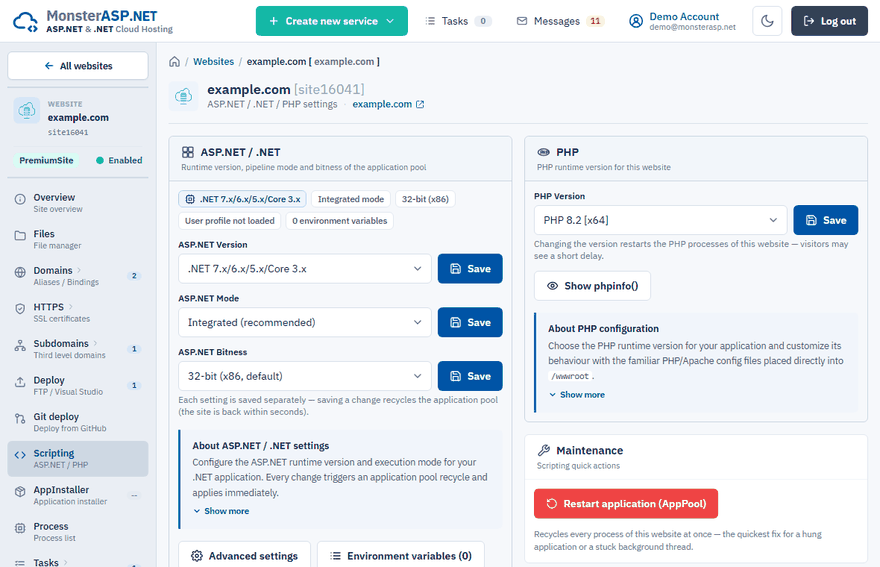
| Setting | Recommendation |
|---|---|
| Pipeline mode | Integrated for all .NET applications. Classic exists only for legacy code written for IIS 6. |
| Bitness | 32-bit (x86) is the default and has a lower memory footprint. Switch to 64-bit (x64) only if your application needs it — native 64-bit libraries or more than 2 GB of data in memory. |
Tip
If an application built for .NET Framework returns an error 500 right after upload, the wrong ASP.NET version is the first thing to check.
ASP.NET Core hosting model
In the ASP.NET Core section you choose between InProcess (recommended, best performance) and OutOfProcess. See ASP.NET Core hosting models.
PHP
PHP is available on Premium plans. On the Free plan it is not available by default — the PHP section then shows PHP is not available.
On a Premium website choose the PHP version in the PHP section and click Save. Changing the version restarts the PHP processes of the website. Show phpinfo() displays the current configuration and loaded modules.
You can adjust PHP with the usual configuration files placed directly in /wwwroot:
.htaccessformod_rewriterules — URL rewriting and redirects,.user.inifor PHP settings such asmemory_limit,upload_max_filesizeandpost_max_size.
Environment variables and restart
From the same page you can open Environment variables and use Restart application (AppPool) to recycle all processes of the website — the quickest fix for a hung application.