Move a database to another region or subscription
Change the datacenter or subscription of a database and what happens during the transfer.
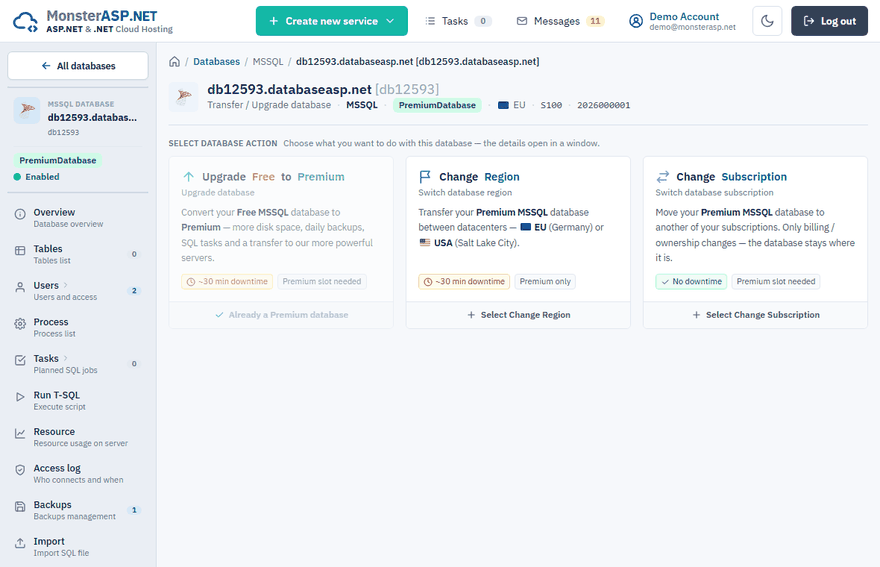
The Upgrade page of a database is where you move it: from Free to Premium, to another datacenter, or under another subscription. Open it in the Control Panel: Databases → your database → Upgrade.
What you can do
| Action | What changes | Downtime |
|---|---|---|
| Upgrade Free to Premium | The database is moved to the Premium servers and placed under a subscription. | Up to about 30 minutes |
| Change Region | A Premium database is moved between the EU (Germany) and USA (Salt Lake City) datacenters. | Up to about 30 minutes |
| Change Subscription | A Premium database is moved under another of your subscriptions. Only billing and ownership change; the database stays on the same server. | None |
The cards on the page show which actions are offered for your database.
Change the region
Important
A database and the website that uses it must always be in the same region. If the database runs in one datacenter and the website in another, every query has to travel between them, and the application becomes very slow and unresponsive. When you move a database, move the websites that connect to it to the same region as well — see Move a website to another subscription or region.
Open the action
On the Upgrade page choose Change Region.
Select the target datacenter
Pick the new datacenter — the one where the website that connects to the database runs.
Confirm
Click Change Region and confirm the details in the next step.
The database gets a new server name. After the transfer, update the connection string in your website. The database name, users and passwords stay the same.
Change the subscription
Choose Change Subscription, select the target subscription and click Change Subscription. The target subscription must have a free Premium database slot; the slot in the current subscription is freed. If the database has disk add-ons assigned, the target subscription must have matching free add-on slots — they move together with the database.
There is no downtime and no connection string change.
Upgrade from Free to Premium
Choose Upgrade Free to Premium, select the subscription and the datacenter and click Upgrade to Premium. The database name, users, passwords and data stay the same — only the server name in your connection string changes. See Upgrade from Free to Premium.
During a transfer
Your database stays available on the current server while the new server is prepared. During the backup, transfer and restore, connections are paused for a short maintenance window, and then DNS is switched to the new server. Database management is locked until the transfer finishes.
Tip
Plan a region change or an upgrade for a quiet time, and have the new connection string ready to deploy right after the transfer.