Upgrade from Free to Premium
Move a free website or database to a Premium subscription.
You do not have to create your project again to move to Premium. An existing Free website and its database can be transferred to the Premium servers in a few steps, with all files and data.
Before you start
You need an active Premium subscription — Premium Single for one project or Premium Multi for up to 10 websites. See Buy a Premium subscription and Free and Premium plans compared.
Warning
The transfer moves the website to different servers and can cause an outage of up to 30 minutes. Plan it for a quiet time.
Upgrade the website
Open the Free website
In the Control Panel go to Websites and open the website you want to upgrade.
Open Upgrade
In the left menu choose Upgrade (Transfer / ScaleUp).
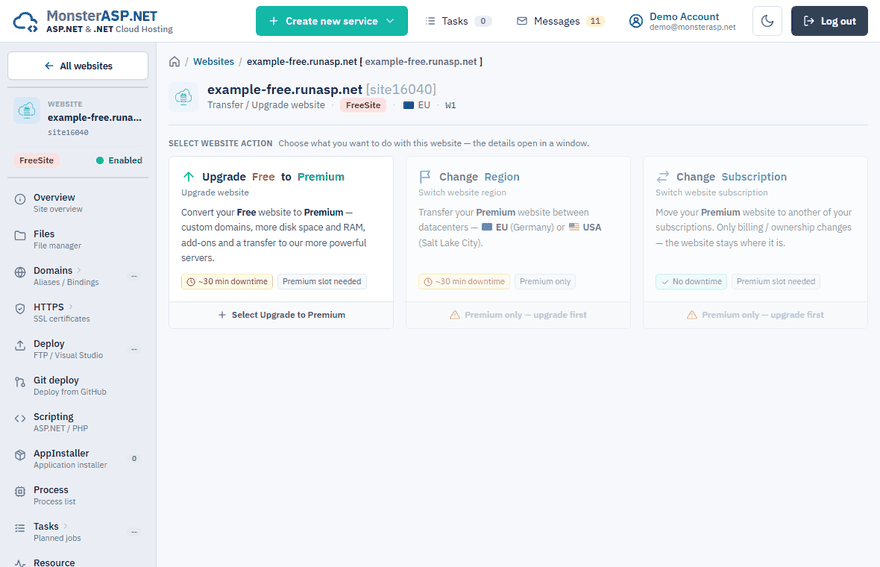
Choose the upgrade to Premium
Under Select website action click Upgrade Free to Premium.
Select the subscription and data center
Choose the subscription the website should belong to — it must have a free Premium website slot — and the data center where it will run. Click Upgrade to Premium.
Confirm
Compare the Before and After summary and confirm with Upgrade to Premium. The website is transferred to the Premium servers; you can follow the progress in Tasks.
Upgrade the database
Repeat the same for every database the website uses: Databases → your database → Upgrade → Upgrade Free to Premium.
Important
Put the website and its database in the same data center. If the website runs in the USA and the database stays in Europe, every query has to travel across the ocean and the application becomes extremely slow.
Free and Premium are also separate environments: a Premium website cannot use the local connection string of a Free database. Upgrade both.
After the upgrade
- Check the connection string in your application — see Find your connection string.
- Add your own domain and enable HTTPS yourself for all domains.
- If you need them, increase the memory of the website or ask for AlwaysRunning.
The Premium subscription is paid but not visible
A payment is usually linked to your account right away. If you paid and the subscription does not appear in the Control Panel after a few minutes, open a support ticket and we will check it.