Redirect all visitors to HTTPS
Force HTTPS for the whole website and avoid redirect loops.
With the HTTPS redirect switched on, every request to http:// is automatically redirected to its secure https:// version. Modern devices work only over https:// and search engines prefer https:// addresses too, so this is the recommended setting for every finished website.
Before you start
Warning
Enable the redirect only after your site already works over https://. Otherwise SSL errors or redirect loops can take your site offline.
The redirect applies to the whole website, that is to every domain connected to it. Each of those domains needs its own certificate first — see Enable HTTPS with Let's Encrypt or Upload your own certificate.
Turn the redirect on
Open your website
Sign in to the Control Panel, go to Websites and select your website.
Open the HTTPS page
In the left menu choose HTTPS.
Check your domains
The summary above the list shows how many domains are secured, for example Secured 2 of 2 domains. Click Enable HTTPS on every row that does not have a certificate yet.
Switch the redirect on
In the Force redirect to HTTPS card set HTTPS Redirect to Enabled.
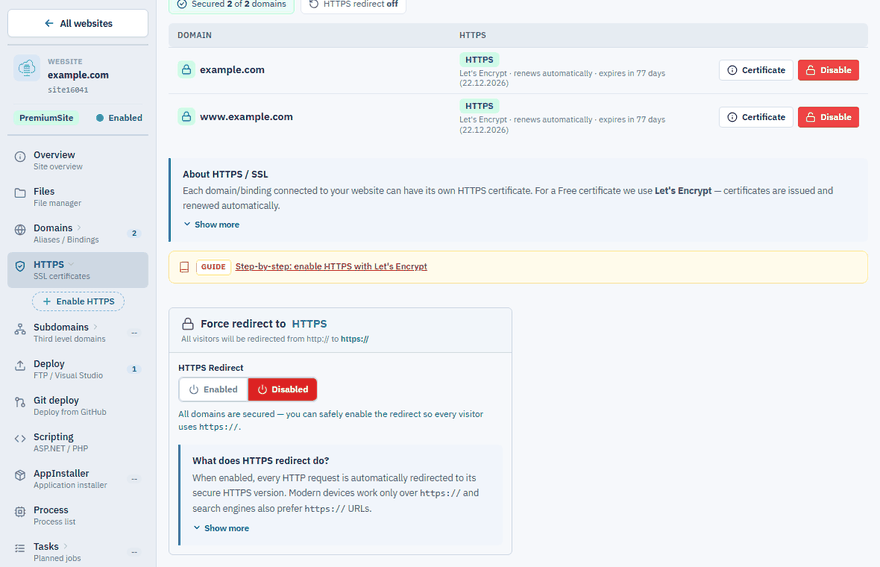
To turn it off again, set HTTPS Redirect to Disabled on the same page.
What the page tells you
The card shows a hint that depends on the state of your domains:
| Situation | What it means |
|---|---|
| No domain has HTTPS | Enabled cannot be clicked. Enable HTTPS on at least one domain first — there is nothing to redirect to yet. |
Some domains still use plain http:// |
Enable HTTPS for them before you switch the redirect on. |
| All domains are secured | You can safely enable the redirect. |
| Redirect is on and a domain has no certificate | Visitors of that domain are redirected to https:// and get a browser security warning. Enable HTTPS for it. |
Important
Remember this when you add another domain or subdomain later. With the redirect on, the new address shows a security warning until you enable HTTPS for it.
If the website stops loading
Set HTTPS Redirect back to Disabled, make sure every domain in the list has a valid certificate and that the site opens over https://, and then enable the redirect again.
If your domain runs through Cloudflare, see Use Cloudflare with your website.
Redirect to one domain
The HTTPS redirect changes only the protocol. To send visitors of all your domains to a single address, open Domains and choose the domain in the Redirect all domains to one card. See Add your own domain to a website.