Add a subdomain
Create a standalone subdomain website, or add a subdomain as another address of a website.
A subdomain is a third-level domain such as blog.example.com or app.example.com. In the Control Panel you can use one in two different ways, so decide first what you need.
| You want | Use | What you get |
|---|---|---|
| A separate application on the subdomain | Subdomains → Add subdomain | A standalone subdomain website with its own files and settings |
| The same website on another address | Domains → Add domain → Your own subdomain | An alias — the subdomain serves the same content as the website |
Important
Both options are Premium features. On a Free website the buttons are marked Premium and lead to the upgrade.
Create a subdomain website
A subdomain website is practically a standalone website. It has its own /wwwroot, FTP / WebDeploy credentials, .NET / PHP version and HTTPS certificates, and does not share files, sessions or processes with the parent website.
Open the parent website
In the Control Panel go to Websites and open the Premium website that runs on your domain.
Open the Subdomains page
In the left menu choose Subdomains and click Add subdomain.
Fill in the dialog
Enter the Subdomain name (only letters, numbers and dash) and check the Domain it is created under. Choose the Region / Datacenter. If you have more subscriptions, select the one to use.
Create it
Click Add. The new subdomain website appears in the list.
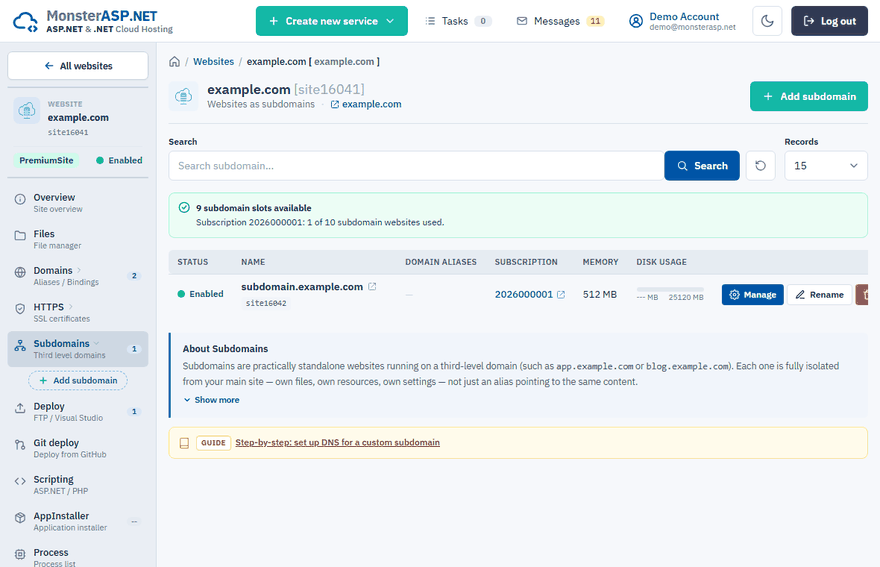
Each subdomain website uses one subdomain slot of your Premium subscription — the counter above the list shows how many are left. Use the Manage button on its row to work with it like with any other website; Rename and Delete are on the same row.
Note
Subdomains can be created only under a top-level custom domain, not under another subdomain.
Add subdomain is not available
Subdomain websites can be created only under your own second-level domain, and that domain has to be the main domain of the parent website. If the Premium website still runs under one of our subdomains (for example *.tryasp.net), the Control Panel refuses to create a subdomain for it.
Add your domain to the website
Open Domains, click Add domain and add your own domain, for example
yourdomain.com. See Add your own domain to a website.Make it the main domain
Rename the website to your domain — see Rename a website.
Create the subdomain
Go back to Subdomains and click Add subdomain. Your domain is now offered under Domain.
Add a subdomain as another address of a website
Start the wizard
Open the website, choose Domains and click Add domain.
Enter the subdomain
Select Your own subdomain and enter the full name without
www., for exampleapi.yourdomain.com. Click Continue.Check the DNS and finish
The last step shows the DNS record the subdomain needs. Click Add Domain.
A subdomain added this way does not use a website slot from your subscription.
Point the subdomain to our servers
If the domain already uses our nameservers, the wizard shows DNS is ready — no setup needed and there is nothing to do.
If the DNS of the domain is hosted elsewhere, add one CNAME record for the subdomain at your DNS provider. Its value is the server name of your website, shown with a Copy button in the last step of the Add domain wizard. The subdomain starts working as soon as the DNS change propagates. More in DNS settings for custom domains.
Enable HTTPS
Certificates are issued per domain, so every subdomain needs its own. Open HTTPS and click Enable HTTPS on its row — see Enable HTTPS with Let's Encrypt.