Renew a subscription
Extend your subscription before it expires.
A Premium subscription is paid for one year. To keep its services running, renew it for another year before it expires.
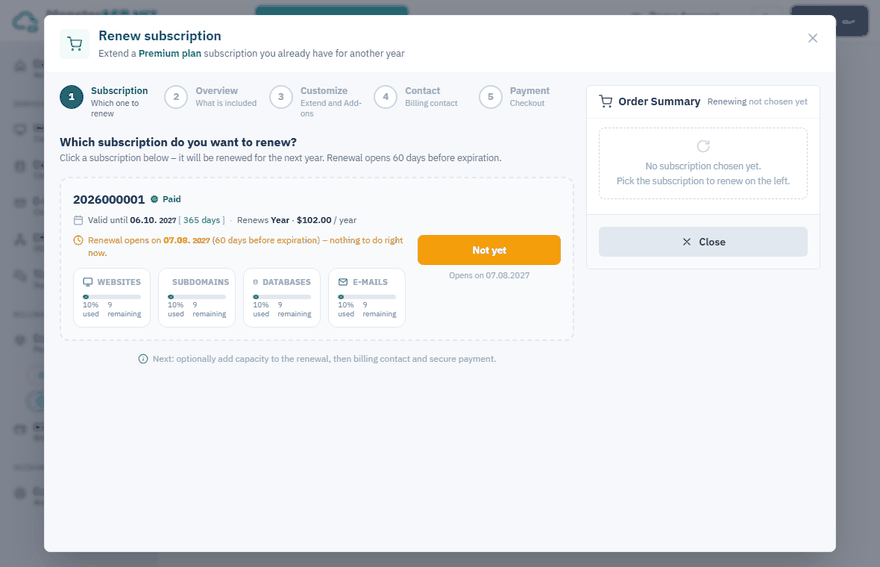
When you can renew
Renewal opens 60 days before expiration. Renewing early costs you nothing: the remaining days are kept and the new period follows the current one.
The Subscriptions list shows the Valid until date of each subscription, and a subscription that needs renewing has the status Renewal due. The overview of a subscription also tells you how many days are left.
Warning
Renew before the subscription expires to avoid interruption. An expired subscription has to be renewed to restore the services using it.
Renew the subscription
Start the renewal
Sign in to the Control Panel, open Subscriptions and click Renew next to the subscription. Inside a subscription use Renew in the left menu.
Subscription
If you have more subscriptions, click the one you want to renew.
Overview
Check what is renewed. All plans and add-ons of the subscription stay exactly as they are and renew for another year at the prices shown.
Customize
Optionally add capacity — whole Premium plans or extra website, database and e-mail add-ons. Everything you add is renewed together with the subscription and billed for the whole year. Here you can also switch a Single plan to Multi. Nothing to add? Just continue.
Contact
Choose a saved billing contact or fill in the details for the invoice.
Payment
Pay at our payment provider Stripe. You come back to the Control Panel automatically.
The subscription is renewed immediately after the payment and all its services keep running without interruption. The invoice is sent to your e-mail and is available under Billing → Invoices.
Not sure about an item or a price?
If you are not sure about some items, discounts or prices in the overview, open a support ticket before you renew and we will help you adjust them.
You do not want to renew
If you only want to stop, simply do not renew when the subscription expires. See Cancel a subscription.