Check the delivery log
Find out what happened to a message that did not arrive.
The delivery log shows the messages your e-mail domain sent and received, and whether the mail server delivered them. Use it when a message did not arrive.
Open the delivery log
Open your e-mail domain
Sign in to the Control Panel, go to E-mails and click Manage next to your domain.
Open the log
In the left menu choose Logs. You can also click View log in the Delivery card on the Overview page, which shows today's totals.
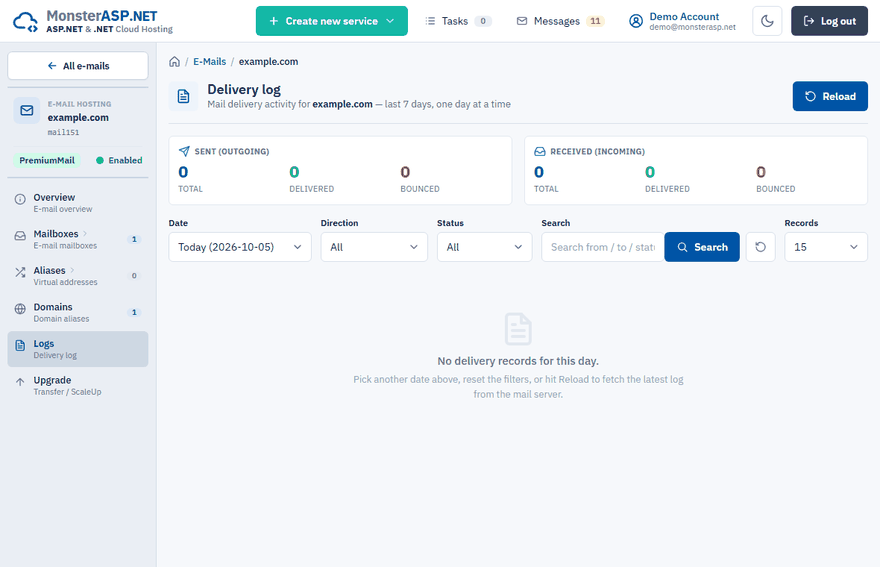
The log covers the last 7 days and shows one day at a time. Click Reload to fetch the latest log from the mail server.
Summary
Two cards at the top count the messages of the selected day:
| Card | Counters |
|---|---|
| Sent (outgoing) | Total, Delivered, Bounced |
| Received (incoming) | Total, Delivered, Bounced |
Find a message
Narrow the list down with the filters above it:
| Filter | Use |
|---|---|
| Date | Pick the day — today, yesterday or an earlier day of the last week. |
| Direction | Sent only or Received only. |
| Status | OK only or Failed only. |
| Search | Searches the sender, the recipient, the status text and the filter. |
Click a column heading to sort the list.
Read a record
| Column | Meaning |
|---|---|
| Time | The time of the record on the selected day. |
| Direction | Whether the message was sent or received. |
| From | The sender address. |
| To | The recipient address. |
| Status | OK for a delivered message, or a failure, followed by the status text of the mail server. |
| Filter | The filter recorded by the mail server for the message, if any. |
Tip
To see only the problems, set Status to Failed only. The text in the Status column tells you why the message was not delivered.
The message is not in the log
- If an incoming message is missing, check that the MX record of your domain points to our mail server. Until it does, incoming mail goes elsewhere — see DNS records for e-mail.
- If the list is empty, pick another date, reset the filters or click Reload.