Find your connection string
Where to copy the connection string for ASP.NET, Entity Framework and other clients.
Every database has two connection strings: a local one for websites hosted with us and a remote one for connections from outside. Using the wrong one is the most common reason an application cannot reach its database.
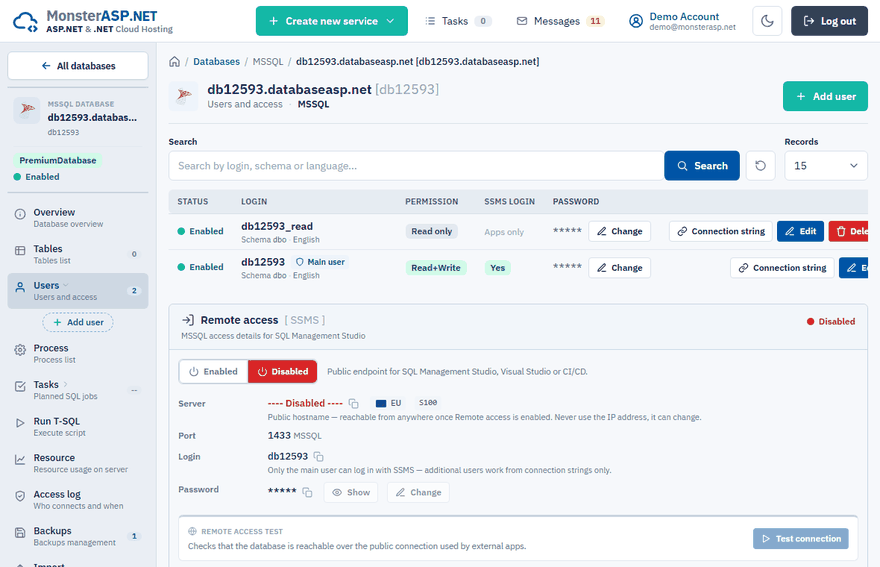
Where to find it
In the Control Panel go to Databases, open your database and then Users. Click Connection string next to a user to see ready-to-use strings for that login — one for Local access and one for Remote access. Copy the one that matches where your application runs.
Which one to use
| Your application runs… | Use |
|---|---|
| on a website hosted with us | The local connection string |
| on your computer during development | The remote connection string (after enabling remote access) |
| on another hosting or server | The remote connection string |
A remote connection string looks like this:
Server=dbXXXX.public.databaseasp.net; Database=dbXXXX; User Id=dbXXXX; Password=your-password; Encrypt=True; TrustServerCertificate=True; MultipleActiveResultSets=True;
Important
Keep TrustServerCertificate=True in the connection string. The connection is still encrypted; the setting only tells the client to accept the certificate of our SQL Server. Without it you get a "certificate chain was issued by an authority that is not trusted" error.
Put it into your application
In an ASP.NET Core application the connection string usually lives in appsettings.json:
{
  "ConnectionStrings": {
    "DefaultConnection": "Server=...; Database=...; User Id=...; Password=...; Encrypt=True; TrustServerCertificate=True;"
  }
}
Mind the JSON syntax — a missing quotation mark here stops the whole application from starting (see HTTP Error 500).
Tip
Keep the local development connection string in appsettings.Development.json and the hosting one in appsettings.json (or in an environment variable), so you do not publish localhost settings by mistake.
Free and Premium are separate
Free hosting and Premium hosting run in separate environments. A Premium website cannot use the local connection string of a Free database, and the other way round. Create the website and its database on the same plan. For testing you can connect them with the public connection string, but it is not recommended for production.