Open a support ticket
Open a ticket, reply, attach files and close it.
A support ticket is the way to reach our support team. You open it in the Control Panel, we reply by e-mail, and the whole conversation stays in the ticket.
Tip
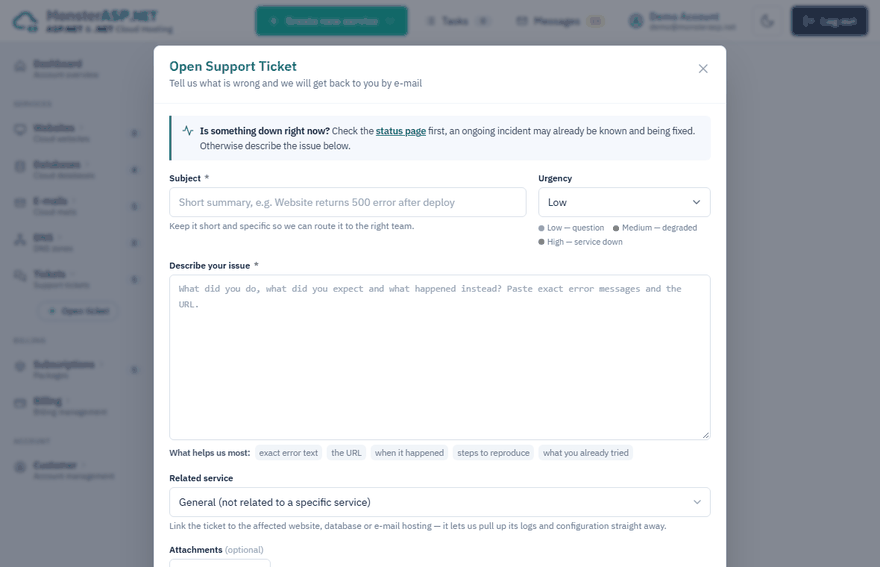
Is something down right now? Check the status page first — an ongoing incident may already be known and being fixed.
Open a ticket
Start a new ticket
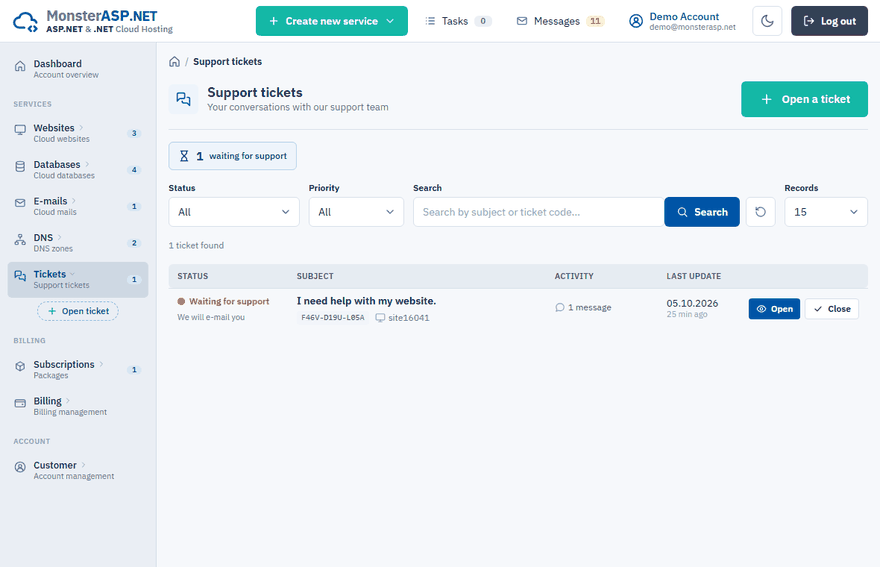
Sign in to the Control Panel, choose Tickets in the left menu and click Open a ticket.
Write the subject
Keep the Subject short and specific, for example Website returns 500 error after deploy.
Choose the urgency
Select Low for a question, Medium when a service is degraded or High when a service is down. High tickets are handled first — please use it only when a service is really down.
Describe the issue
In Describe your issue say what you did, what you expected and what happened instead.
Link the related service
In Related service pick the affected website, database or e-mail hosting. It lets us pull up its logs and configuration straight away.
Send
Click Open ticket. Replies are sent to the e-mail address of your account.
What helps us most
- the exact error text,
- the URL,
- when it happened,
- steps to reproduce the problem,
- what you already tried.
Attachments
Click Attach a file to add screenshots, logs or config files. Allowed types are png, jpg, webp, txt, json, xml and config, up to 100 MB each. You can also add files later with Attach file above the reply box or on the Attachments page of the ticket, where you can download or delete them too.
Follow a ticket and reply
Open the ticket from the Tickets list. Our answer arrives by e-mail and also appears in the ticket under Conversation. To answer, type into Post a reply and click Send reply.
| Status | Meaning |
|---|---|
| Waiting for support | We have not answered your last message yet. |
| In progress | We are working on it. |
| On hold | The ticket is paused. |
| Support replied | We answered and are waiting for your reply. |
| Closed | The ticket is resolved. |
Close a ticket
When your question is answered, click Close ticket. The ticket is marked as resolved and our team will not reply to it any more. If you are still waiting for our answer, keep it open.
A closed ticket can be re-opened at any time: just post a new reply. The conversation and all attachments stay in place.
Note
Managers with the Billing permission cannot open support tickets. See Give someone access with Managers.