Add services to a Premium subscription
Extend a subscription with more websites, databases or e-mail domains.
When a Premium subscription runs out of free slots, you do not need a second subscription. The Add capacity wizard extends the subscription you already have with more websites, databases or e-mail domains.
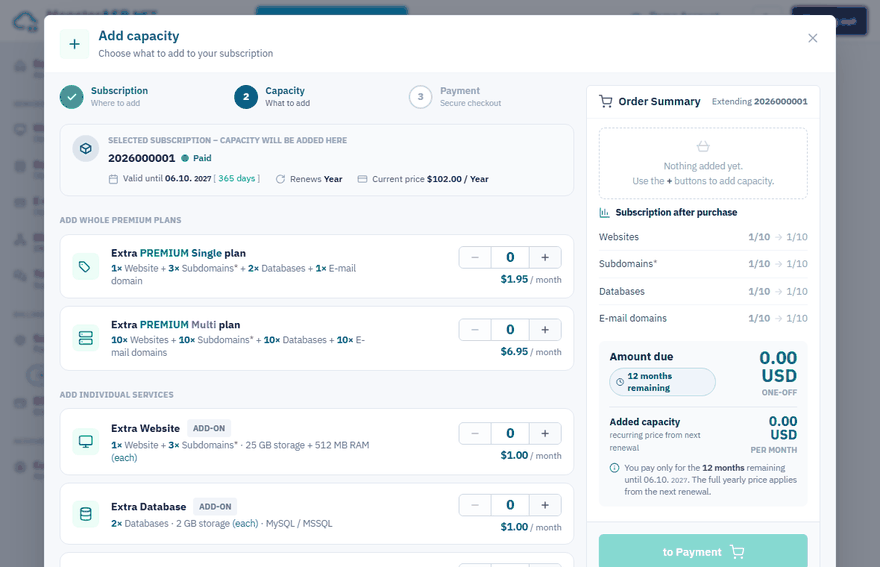
What you can add
| Item | What it adds |
|---|---|
| Extra Website add-on | 1 website + 3 subdomains, each with 25 GB storage and 512 MB RAM |
| Extra Database add-on | 2 databases (MySQL / MSSQL), 2 GB storage each |
| Extra E-mail domain add-on | 1 e-mail domain with 10 GB, 10 mailboxes and 10 aliases |
| Extra Premium Single plan | 1 website + 3 subdomains, 2 databases and 1 e-mail domain |
| Extra Premium Multi plan | 10 websites + 10 subdomains, 10 databases and 10 e-mail domains |
Current prices are shown in the wizard and on the price list.
Add capacity
Start the wizard
Sign in to the Control Panel, open Subscriptions and click Extend next to the subscription. Inside a subscription the same wizard opens with Extend in the left menu or Add capacity on the overview.
Subscription
If you have more subscriptions, click the one you want to extend.
Capacity
Use the + and − buttons to choose what to add. The Order Summary shows the amount due now and what the subscription will contain after the purchase.
Payment
Click to Payment and pay at our payment provider Stripe. You come back to the Control Panel automatically.
The new limits apply immediately after the payment.
How add-ons are billed
You pay only for the months remaining until the subscription expires. From the next renewal the added capacity is renewed together with the subscription for the full yearly price.
Important
Capacity cannot be added when the subscription has less than 60 days left. Renew it first — you can add capacity directly in the renewal wizard. See Renew a subscription.
More memory or disk space
To check what a website or database uses and what to do when the limit is reached, see Increase the memory (RAM) of a website and Increase the disk space of a database.
Related
- Change your plan — switch a Single plan to Multi
- Buy a Premium subscription
- Billing period and refunds