Create a website for your own domain
Start a new website directly on a custom domain instead of a free subdomain.
If you already own a domain, you can create the website directly on it — there is no need to start on a free subdomain and switch later. The Create website wizard takes the domain, shows you the DNS records it needs and creates the website.
Important
Your own domains are a Premium feature. You need a Premium subscription with a free website slot, and a registered domain — see Where to register a domain.
Create the website
Start the wizard
In the Control Panel go to Websites and click Add website.
Choose the plan
Click Select PREMIUM website.
Enter your domain
Select Your own domain and type the domain into Domain name without
www., for exampleyourdomain.com. Click Continue.Review the DNS step
The wizard shows how to point the domain to us. You can continue right away — the exact values are provided after the website is created and you set up DNS then. If the domain already uses our DNS servers, you see DNS is ready — no setup needed.
Choose the subscription
Pick the Premium subscription the website will use. It takes one website slot. If the subscription has no free slot left, click Add capacity or choose another subscription.
Choose the datacenter
Select the Europe Datacenter or the USA Datacenter — whichever is closer to most of your visitors.
Finish
Optionally choose an example application, check the Summary and click Create Website.
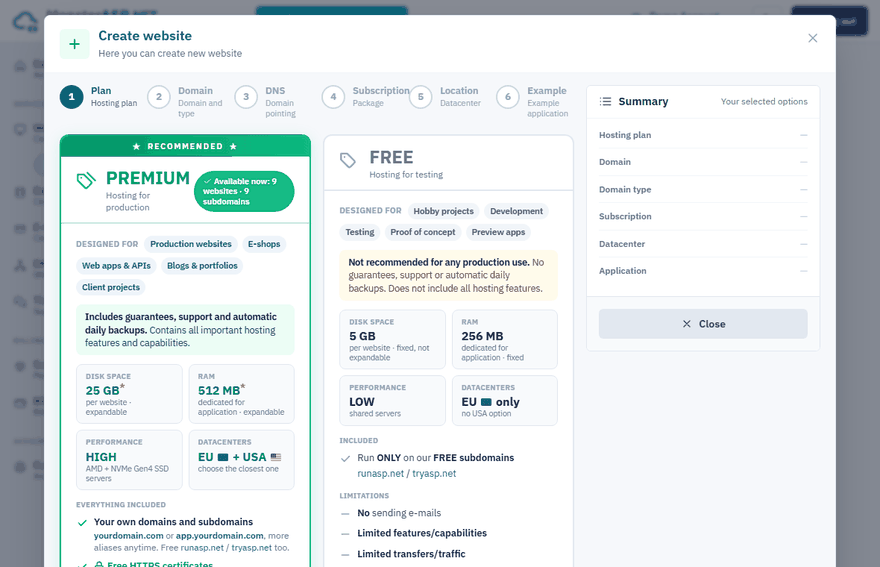
Point the domain to the website
The wizard offers two options.
Option 1: point your whole domain to us (recommended)
Best if you want everything — websites, subdomains, databases and e-mails — to run on our servers. At your domain registrar, set the nameservers of the domain to:
ns1.machineasp.net
ns2.machineasp.net
ns3.machineasp.net
Nameserver changes can take up to 24 hours to propagate worldwide.
Option 2: add DNS records only
Best if you keep DNS, other subdomains, databases or e-mails at another provider. Add these records at your DNS provider:
| Name | Type | Value |
|---|---|---|
@ |
A | The IP address shown in the Control Panel |
www |
CNAME | siteXXXX.siteasp.net |
Details and checks are in DNS settings for custom domains.
Once DNS propagates (usually minutes to a few hours), your website is live on the domain. On the Domains page of the website the DNS column shows Points here as soon as the domain resolves to our server.
Tip
Need to test before the DNS is ready? Add one of our free subdomains to the website as a temporary address: Domains → Add domain → Free subdomain.
A website on a subdomain
To create the website on a subdomain of a domain you own, select Your own subdomain in step 3 and enter the full name, for example app.yourdomain.com. It needs only one CNAME record and uses a subdomain slot of your subscription instead of a website slot. See Add a subdomain.
Next steps
- Enable HTTPS with Let's Encrypt — after the domain points to the website.
- Publish your first application