Change collation and compatibility level
What the two settings do and how to change them safely.
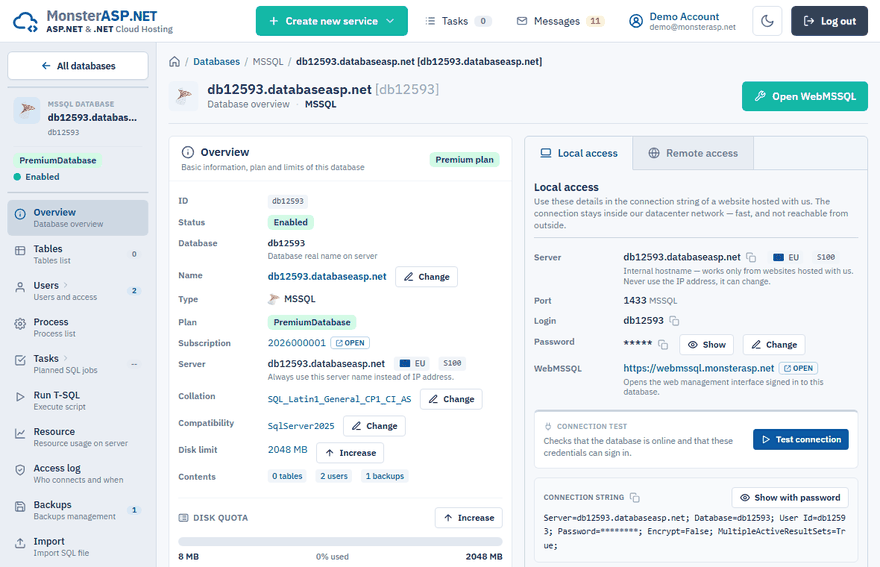
The collation and the compatibility level of an MSSQL database are set when it is created, and both can be changed later on the Overview page of the database in the Control Panel (Databases → your database).
Change the collation
Collation defines how text is sorted and compared — which language rules apply, and whether case and accents matter. In the name, CI means case-insensitive, CS case-sensitive, and AI / AS accent-insensitive / accent-sensitive. Most applications expect a _CI_AS collation.
Open the dialog
On the Overview page click Change in the Collation row.
Choose the collation
Type a language or collation name into New collation and select it from the list.
Save
Click Save collation. The change needs a brief exclusive lock on the database, so open connections are dropped for a moment.
Important
Changing the database collation only sets the default for new tables and columns. Existing columns are not converted, and mixing collations can cause "collation conflict" errors in joins.
To convert an existing column, alter it explicitly on the Run T-SQL page:
ALTER TABLE dbo.Customers ALTER COLUMN Name nvarchar(200) COLLATE Czech_CI_AS;
Change the compatibility level
The compatibility level controls which T-SQL behaviours and query optimizer features the database uses — not which SQL Server version it runs on. Each level matches a SQL Server version, and the database can use any level up to the version of the server it is hosted on.
Open the dialog
On the Overview page click Change in the Compatibility row.
Choose the level
Select the New compatibility level and click Save level.
Keep the newest level unless an application needs an older one. Lower it only if a legacy application relies on old behaviour.
- The change is immediate, does not touch your data or schema, and can be changed back at any time.
- It clears the cached query plans of the database, so the first queries afterwards can be slightly slower.
- A restored backup keeps the level of the source server. Raising it lets the database benefit from the newer query optimizer.
Note
The compatibility level does not help with restoring a backup made on a newer SQL Server version. See Restore an MSSQL database.