Cancel a subscription
What happens to your services when a subscription is cancelled or expires.
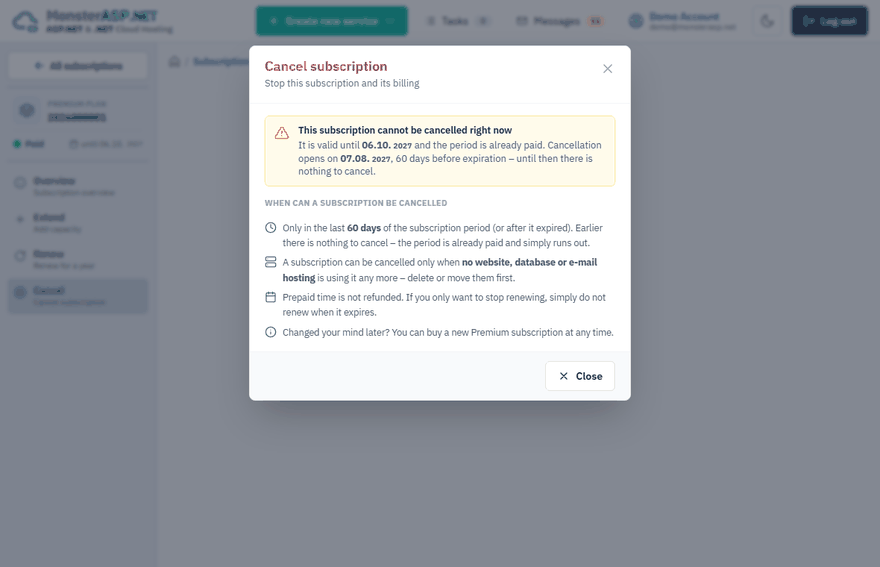
A Premium subscription is paid for a year in advance. Cancelling it means that it will not be renewed or billed again.
Tip
If you only want to stop renewing, you do not have to cancel anything. Simply do not renew the subscription when it expires.
When a subscription can be cancelled
Two conditions must be met:
- It is in the last 60 days of its period, or it has already expired. Earlier there is nothing to cancel — the period is already paid and simply runs out.
- No website, database or e-mail hosting is using it. Delete these services or move them to another subscription first.
If a condition is not met, the Cancel subscription window tells you which one and, when it is too early, the date from which cancellation opens.
Before you cancel
Save your data
Download the files and database backups you want to keep. See Backups of your data.
Remove or move the services
Delete the websites, databases and e-mail hosting that use the subscription, or move them to another subscription with the Upgrade page of each service. See Delete a website and Move a website to another subscription or region.
Cancel the subscription
Open the subscription
Sign in to the Control Panel, open Subscriptions and click Cancel next to the subscription. Inside a subscription use Cancel in the left menu.
Confirm
Tick I understand that the subscription will be cancelled. and click Cancel subscription.
Warning
Cancelling cannot be undone, and prepaid time is not refunded. If you change your mind later, you can buy a new Premium subscription at any time.
Refunds
A new subscription that does not work for you is covered by the money-back guarantee, which is handled by our support and not by the Cancel button. See Billing period and refunds.