Messages and notifications
Read the messages we send to your account.
The Messages page keeps a copy of every e-mail we send you about your services, invoices and account. If a message did not reach your inbox or you deleted it, you can read it again here.
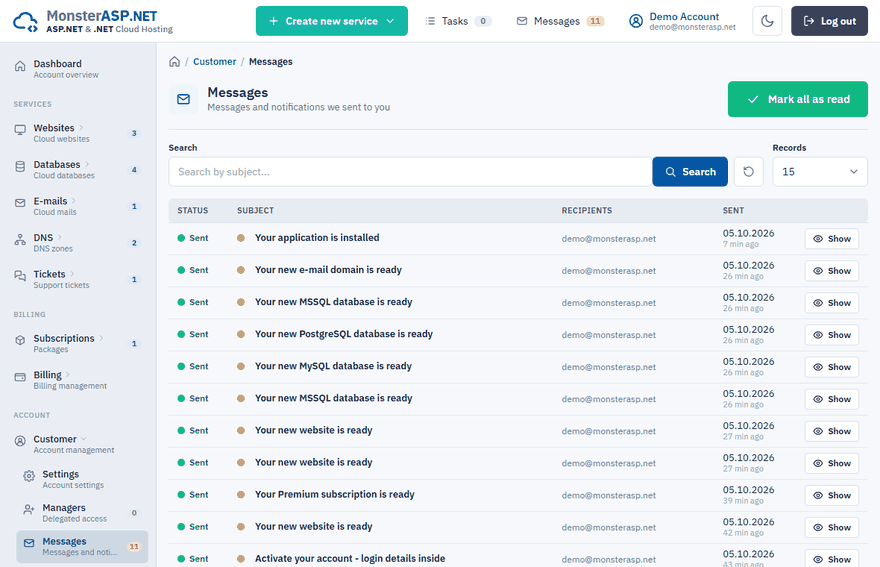
Open your messages
Sign in to the Control Panel and either:
- click Messages in the top bar — the number next to it shows how many messages are unread, or
- choose Messages in the Customer section of the left menu.
Read a message
The list shows the Subject of each message, its Recipients and the date it was Sent. Unread messages are marked with a dot and shown in bold.
Click the subject or Show to open the message and read its content.
Use Search to find a message by its subject, and Records to choose how many rows are shown.
Mark everything as read
Click Mark all as read
The button is at the top of the Messages page.
Confirm
Click Mark all as read in the confirmation window.
All unread messages are marked as read and the unread counter in the top bar resets. The messages themselves stay in the list.
Messages do not arrive in your inbox
The Recipients column shows the address each message was sent to. If you can see a message here but not in your mailbox:
- check the spam folder of your mailbox,
- check that the E-mail shown in Settings is the address you actually read. To change it, see Change your e-mail or delete your account.
Note
Replies from our support team are part of a ticket. You find the whole conversation under Tickets — see Open a support ticket.