Buy a Premium subscription
Choose a plan and complete the order.
A Premium subscription is ordered in the Control Panel in four steps: choose a plan, customize it, fill in the billing contact and pay. The subscription is active immediately after the payment.
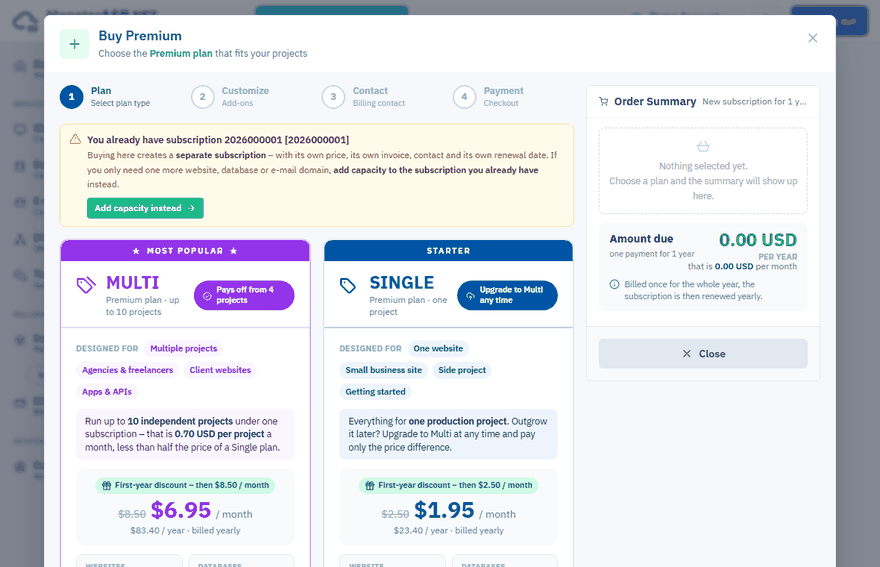
Choose between Single and Multi
| SINGLE | MULTI | |
|---|---|---|
| Designed for | One production project | Up to 10 independent projects |
| Websites | 1 + 3 subdomains | 10 + 10 subdomains |
| Per website | 25 GB storage + 512 MB RAM | 25 GB storage + 512 MB RAM |
| Databases (MySQL / MSSQL) | 2, 2 GB each | 10, 2 GB each |
| E-mail domains | 1 (10 GB, 10 mailboxes + 10 aliases) | 10 (10 GB, 10 mailboxes + 10 aliases each) |
Current prices are shown in the wizard and on the price list. See also Free and Premium plans compared.
Tip
Not sure? Pick Single for one production project. You can switch a Single plan to Multi later and pay only the difference — see Change your plan.
Order the subscription
Start the order
Sign in to the Control Panel, open Subscriptions and click Buy Premium plan.
Plan
Select the SINGLE or MULTI plan.
Customize
Most customers need one plan. With the + and − buttons you can add more plans or extra capacity — Extra Website, Extra Database or Extra E-mail add-ons. The Order Summary shows what the new subscription will contain and the amount due. Click Continue.
Contact
Fill in the billing contact for the invoice: name or company name, address, country and e-mail. Companies can add a Company Registration ID and VAT ID. If you ordered before, click one of your saved billing contacts to use it. See Change your billing details.
Payment
You are redirected to our payment provider Stripe. After the payment is confirmed you come back to the Control Panel automatically.
The subscription is billed once for the whole year and is then renewed yearly. The invoice is sent to your e-mail and is available under Billing → Invoices.
Already have a subscription?
Buying here creates a separate subscription with its own price, invoice, contact and renewal date. If you only need one more website, database or e-mail domain, add capacity to the subscription you already have — see Add services to a Premium subscription.
After the purchase
You can start creating websites, databases and e-mail domains right away. To move an existing Free website or database to the new subscription, see Upgrade from Free to Premium.
The payment did not go through
If the payment was cancelled or declined, nothing was ordered and no money was taken — start the order again. If you paid but the result page shows an error, do not pay again: open a support ticket and we will check the payment and finish the order.