Create an e-mail or domain alias
Receive mail for several addresses or domains in a single mailbox.
An alias is a virtual address, such as info@yourdomain.com, that has no mailbox of its own. Messages sent to it are automatically forwarded to one or more existing mailboxes of the domain.
Create an alias
Open the alias list
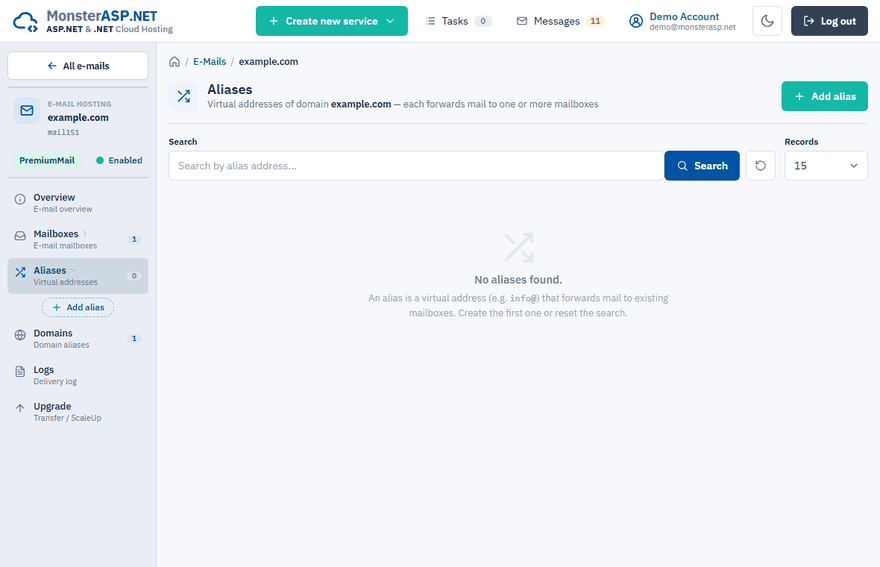
Sign in to the Control Panel, go to E-mails, click Manage next to your domain and choose Aliases in the left menu.
Click Add alias
Fill in the Alias address — the part before
@, for exampleinfo.Add the target mailboxes
Under Target mailboxes select a mailbox from the list and click Add. Repeat this for every mailbox that should receive the messages.
Save
Click Create alias.
Change or delete an alias
In the Aliases list click Edit to add or remove target mailboxes. Changes on the Edit alias page are saved immediately.
Click Delete to remove the alias. The target mailboxes are not affected.
Warning
Mail sent to a deleted alias bounces. Deleting an alias cannot be undone.
Catch-all alias
A catch-all alias also receives mail sent to any address of the domain that does not exist. A domain can have only one catch-all alias; creating a new one replaces the current one.
The Catch-all alias option appears on the Add alias page only when catch-all is enabled for your e-mail domain. See E-mail service limits for how to get it enabled.
Domain aliases
A domain alias lets the same mailboxes receive mail sent to another domain of yours. Every mailbox and alias of yourdomain.com then also receives mail addressed to the new domain — for example, info@other-domain.com lands in info@yourdomain.com.
Open the domain list
In the left menu of your e-mail domain choose Domains.
Add the domain
Click Add domain, enter the Domain name without www. and click Add domain.
Point the MX record
Set the MX record of the new domain to our mail server, otherwise its mail goes elsewhere. See DNS records for e-mail.
The primary domain is listed here as well and cannot be deleted. When you delete a domain alias, mail sent to addresses at that domain is no longer delivered to your mailboxes; the mailboxes themselves and the primary domain stay untouched.