Tables, database files and shrink
See table sizes, reclaim unused space and empty a database.
The Tables page lists the tables of your database with their size, shows the physical database files and lets you reclaim unused space or empty the whole database.
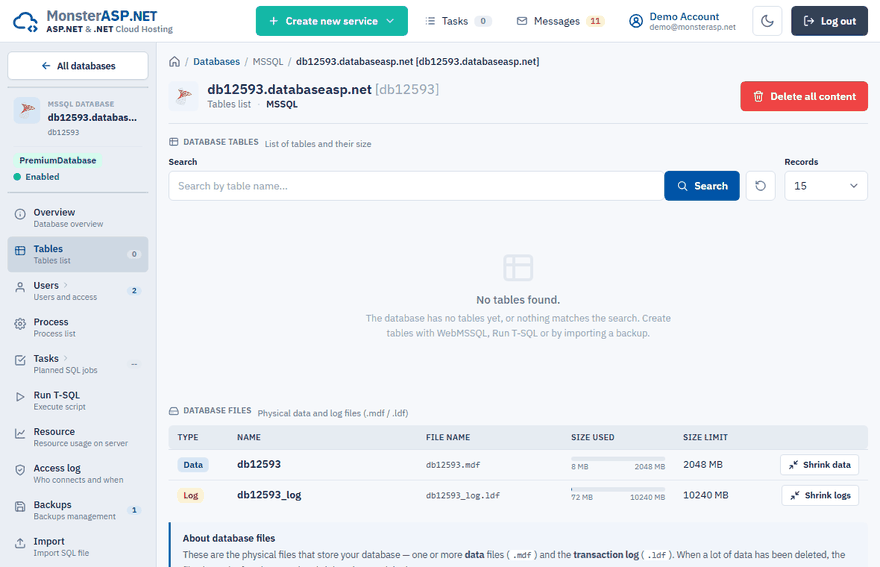
Open it in the Control Panel: Databases → your database → Tables.
See what takes up space
The Database tables list shows every table and its size, so you can quickly find the ones that fill your disk limit. To look inside a table or edit its data, open WebMSSQL.
Reclaim space with Shrink
The Database files panel shows the data files (.mdf) and the transaction log (.ldf). When a lot of data has been deleted, the files keep the freed space; the shrink actions return it.
| Action | What it does |
|---|---|
| Shrink logs | Releases unused space at the end of the transaction log. Fast — no data is moved. |
| Shrink data | Reorganizes the pages of the data file to reclaim unused space. On large databases it can take a while and add load. |
A shrink runs in the background; the Shrink jobs panel shows its progress, and you can leave the page in the meantime.
Tip
Shrink only when you have permanently freed a lot of space. Repeated shrinking of a database that keeps growing causes fragmentation, and the files just grow back.
Delete all content
Delete all content empties the database without deleting the database itself. It drops all tables, views, stored procedures, functions and other objects together with their data. The database, its users and access settings are kept, so connection strings keep working.
Start the action
On the Tables page click Delete all content.
Keep the safety backup
Leave Create a safety backup of the current data first (recommended) ticked. The current content is saved as a
_before_clean_file on the Backups page, so you can restore it later.Confirm
Tick I understand that all current data will be deleted and click Delete all content.
Warning
This cannot be undone without the safety backup. Applications using the database will fail until you restore a backup or re-create the schema.