Import a .sql script
Run a large SQL script against your database with the Import tool.
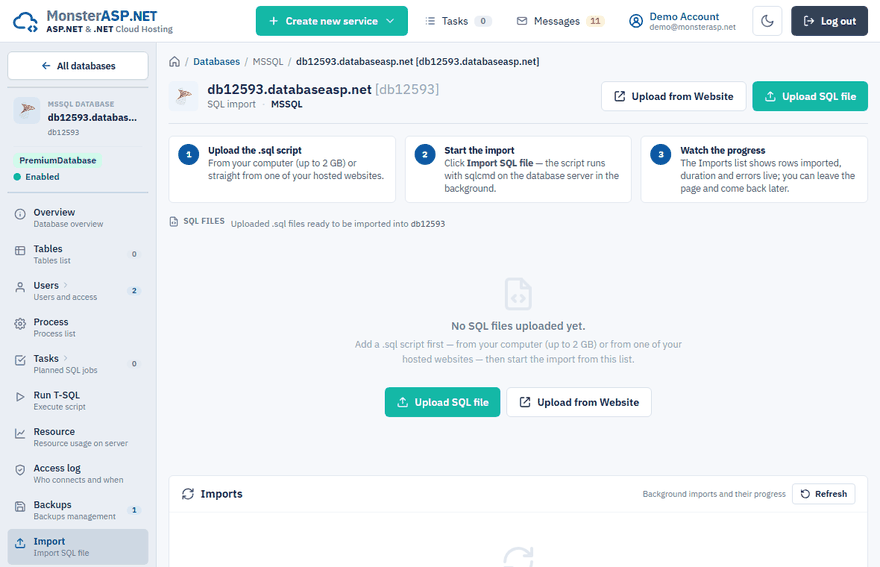
The Import page runs a .sql script against your database on the server. It is meant for large scripts — a schema and data export, for example — that are too big to paste into a query window. The import runs in the background, so you can leave the page and check the progress later.
Import a script
Open the Import page
In the Control Panel go to Databases, open your database and choose Import in the left menu.
Upload the .sql file
Click Upload SQL file and choose a file from your computer (up to 2 GB), or click Upload from Website to copy a
.sqlfile that is already uploaded to one of your hosted websites. Keep the upload window open until it finishes.Start the import
In the SQL files list click Import SQL file next to the script and confirm with Start import. The script runs with sqlcmd on the database server.
Watch the progress
The Imports list shows when the import started, its duration, rows affected and errors. Click Detail to open the live log.
Warning
Statements are executed with the owner privileges of the database and cannot be undone. If the script drops or overwrites data, create a backup first.
What to expect
- Only one import per database can run at a time.
- Errors in individual statements do not stop the import. They are collected in the log, so you can fix and re-run only the failed parts.
- Scripts that switch to or reference the system databases (
master,model,msdb,tempdb) are rejected. Remove such statements from the script before uploading. - Uploaded files and import logs are kept for a limited time and then removed automatically.
Stop a running import
Click Cancel next to the running import and confirm with Stop import. The process is stopped immediately, but rows already imported stay in the database — the script is not rolled back, so the data may be incomplete. The uploaded file is kept, so you can fix it and start again.
Other ways to load data
| You have | Use |
|---|---|
A .bak backup file |
Restore an MSSQL database |
| A short script or a single query | Run T-SQL in the left menu of the database |
| A script you want to run interactively | WebMSSQL |