Billing details on your invoices
Where the name, address and VAT number on your invoices come from and how to use different ones.
A billing contact holds the details printed on your invoices: name or company name, address, registration number and VAT number. It is created from the details you enter when you buy a Premium subscription.
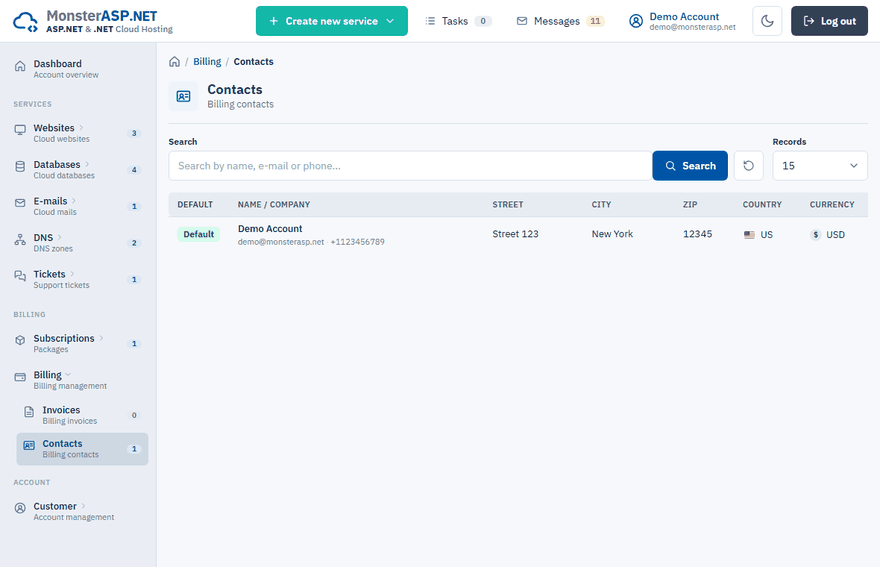
See your billing contacts
Sign in to the Control Panel and choose Billing → Contacts in the left menu. The list shows every contact with its name or company, address, country, currency, Reg. number and VAT number. The contact marked Default is the one used on your invoices.
The Billing card on the Settings page shows the billing details of your account as well.
Use different details for the next invoice
Billing details are entered in the Contact step of an order. You go through it whenever you buy a subscription or renew one.
Reach the Contact step
Start the order or the renewal and continue to Billing contact.
Pick a saved contact or type new details
Click one of your saved billing contacts to fill the form with it, or fill in Full Name or Company Name, the address, City, Zip Code and Country.
Add company details
Buying as a company? Fill in the Company Registration ID and the VAT ID.
Check the e-mail
Invoices and renewal notices go to the Email of the contact.
Continue to the payment
The summary Invoice will be issued to shows what will be printed on the invoice.
VAT ID and reverse charge
If your company is registered for VAT in the EU, enter the VAT ID including the country prefix, for example DE123456789, and click Verify in VIES. The number is checked against the EU VIES register.
- A valid EU VAT ID means the invoice is issued in reverse charge mode (0% VAT). The exception is a Czech VAT ID: it is a domestic one, so the invoice is issued without reverse charge.
- The prefix of the VAT ID must match the selected country.
- When the register returns your company name and address, you can click Fill in the form with these details.
Country and currency
The country and currency of your account are set in Settings → Update info. They are locked while you have an active Premium subscription, because they are printed on your invoices. Contact support if they need to change. See Change your account settings.
An invoice was issued with wrong details
An invoice that already exists cannot be edited in the Control Panel. Open a support ticket, tell us the invoice number and the correct details.