Create an FTP account limited to a folder
Give a developer or a tool FTP access to a single folder only.
Every website has a main FTP account with full access to the whole site. In addition you can create extra FTP accounts that are limited to a single folder — handy for a developer or an upload tool that must not see the rest of the website.
Create an account
Open the Deploy page
Sign in to the Control Panel, go to Websites, select your website and choose Deploy in the left menu.
Add an account
Click Add FTP account.
Choose the login
Fill in Login using letters and digits only. The ID of the website is added in front of it automatically, so the final login looks like
siteXXXX_login.Set the password
Enter a Password of at least 8 characters, or click Generate to get a strong one. We recommend the generated password.
Choose the permission
Select Read+Write or Read only under Permission.
Choose the folder
Under Target folder click the folder that should become the home folder of the account. Folders expand on click. The account can access only this folder and everything inside it.
Save
Click Add account.
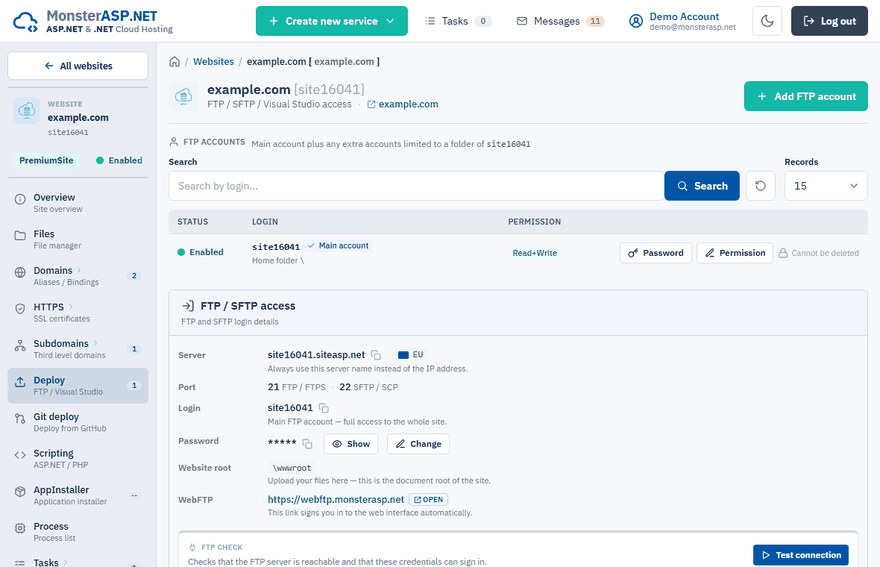
The new account appears in the FTP accounts list on the Deploy page, together with the main account.
Permissions
| Permission | What the account can do |
|---|---|
| Read+Write | Download, upload, change and delete files in its folder. |
| Read only | Download and list files. It cannot upload, change or delete anything. |
Connect with the account
The extra account uses the same Server and Port as the main account — you find them in the FTP / SFTP access card on the Deploy page. Only the login and the password differ. After connecting, the user lands directly in the target folder and cannot go above it.
See Upload files with FTP or SFTP for how to set up an FTP client.
Manage accounts
Each account in the FTP accounts list has these actions:
- Password sets a new password. Update the saved password in the FTP client afterwards.
- Permission switches the account between Read+Write and Read only.
- Delete removes the account. It stops working immediately; the files in its home folder stay untouched. This cannot be undone.
Note
The main FTP account belongs to the website. It cannot be deleted and its permission cannot be changed — you can only change its password.
Need access to more than files?
An extra FTP account gives access to the files of one folder only. If someone should manage your services in the Control Panel without knowing your password, see Give someone access with Managers.