Manage a database in the browser
Open WebMSSQL, WebMySQL or WebPGSQL to browse tables and run queries without installing anything.
Every database comes with a web management interface, so you can browse tables, edit data and run queries without installing a client. The tools open in a new browser tab and sign you in automatically — no password needed.
Open the web interface
Open your database
In the Control Panel go to Databases and open the database.
Choose the web interface
In the left menu click WebMSSQL, WebMySQL or WebPGSQL, depending on the type of the database.
Open the tool
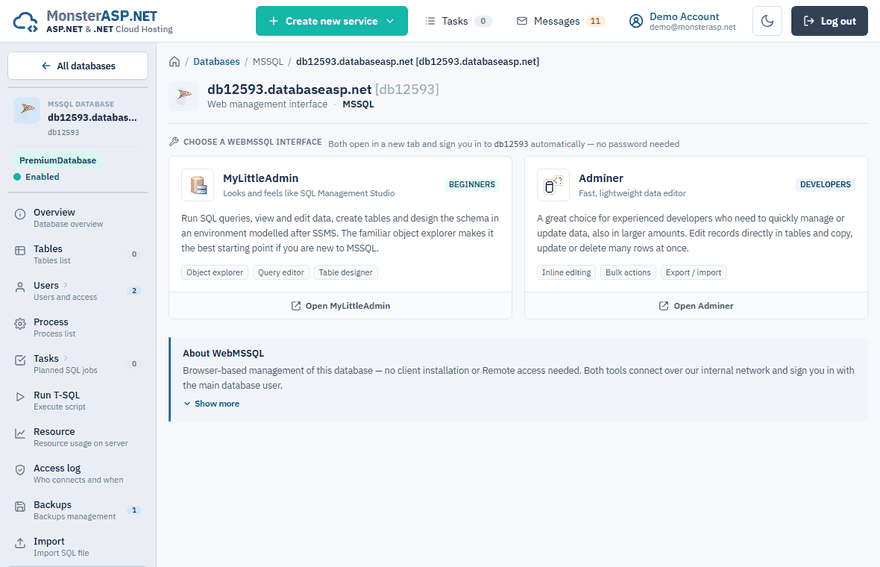
Click the button of the tool you want, for example Open Adminer. You are signed in with the main database user.
Which tools are available
| Database | Page | Tools |
|---|---|---|
| MSSQL | WebMSSQL | MyLittleAdmin, Adminer |
| MySQL | WebMySQL | phpMyAdmin, Adminer |
| PostgreSQL | WebPGSQL | Adminer |
MyLittleAdmin (MSSQL)
Looks and feels like SQL Server Management Studio, with an object explorer, a query editor and a table designer. It is the best starting point if you are new to MSSQL.
phpMyAdmin (MySQL)
The classic MySQL web administration with a database browser, an SQL editor and export / import. It is the best starting point if you are new to MySQL, and the place to import large dumps.
Adminer (all database types)
A fast, lightweight data editor aimed at experienced developers. You can edit records directly in tables and copy, update or delete many rows at once. It also offers export and import.
Warning
The sign-in link is generated for your current session only. Do not share the URL of the opened tool — it carries your credentials.
Good to know
- You do not have to enable Remote access to use the web interfaces of MSSQL and MySQL databases; the tools connect over our internal network.
- For a quick query you do not need to leave the Control Panel: use Run T-SQL (MSSQL) or Run SQL (MySQL, PostgreSQL) in the left menu of the database.
- For a large MSSQL script use Import a .sql script. To move a whole PostgreSQL database use backups.
Prefer a desktop client?
Enable remote access and connect with the tool you are used to:
- MSSQL — SQL Server Management Studio
- MySQL — HeidiSQL, MySQL Workbench or DBeaver
- PostgreSQL — pgAdmin, DBeaver or psql