IMAP, POP3 and SMTP settings
Server names, ports and encryption for any e-mail client.
Use these settings to add your mailbox to any e-mail application — Outlook, Thunderbird, Apple Mail or the mail app on your phone.
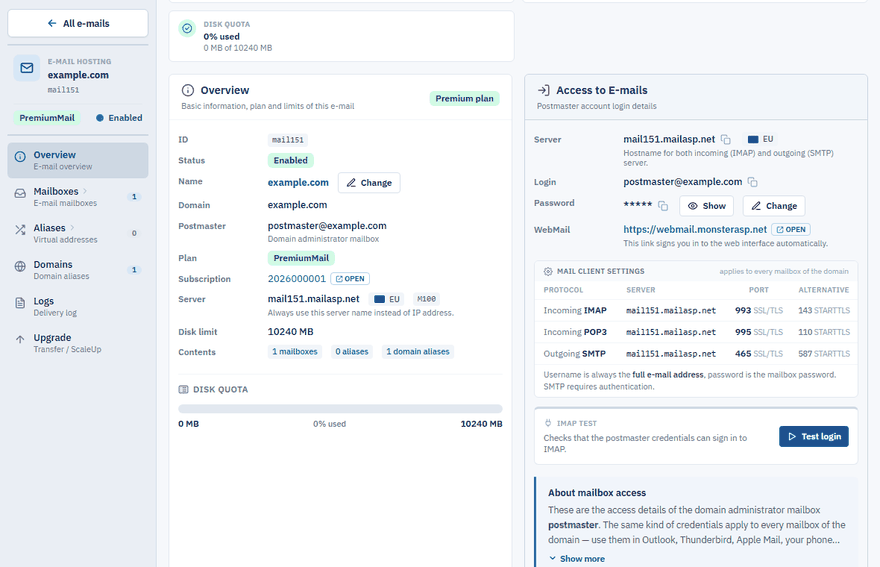
Your mail server
The name of your mail server has the form mailXXX.mailasp.net. You find the exact name in the Control Panel under E-mails → your domain → Overview, in the Server field. Always use this name instead of an IP address.
The login is always your full e-mail address and the password is the password of the mailbox.
Incoming mail
Choose one of the two protocols.
IMAP (recommended)
IMAP keeps your messages on the server and synchronises them between all your devices.
| Setting | Value |
|---|---|
| Server | mailXXX.mailasp.net |
| Port | 993 with SSL/TLS, or 143 with STARTTLS |
| Login | Your e-mail address |
| Password | Your mailbox password |
POP3
POP3 downloads messages to one device and usually deletes them from the server.
| Setting | Value |
|---|---|
| Server | mailXXX.mailasp.net |
| Port | 995 with SSL/TLS, or 110 with STARTTLS |
| Login | Your e-mail address |
| Password | Your mailbox password |
Outgoing mail (SMTP)
| Setting | Value |
|---|---|
| Server | mailXXX.mailasp.net |
| Port | 465 with SSL/TLS, or 587 with STARTTLS |
| Login | Your e-mail address |
| Password | Your mailbox password |
WebMail
You can always read and send your e-mails in a browser at webmail.monsterasp.net.