DNS records for e-mail
The MX, SPF, DKIM and autodiscover records your domain needs for e-mail hosting.
Your mailboxes receive mail only when the DNS of your domain points to our mail server. The Control Panel checks this for you and shows the exact records to set.
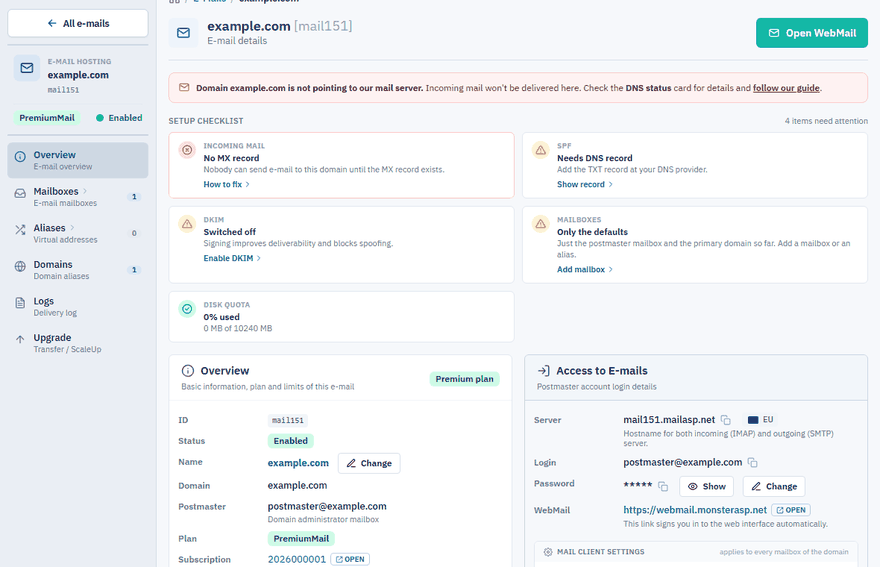
Check the DNS status
Sign in to the Control Panel, go to E-mails and click Manage next to your domain. The Overview page shows a DNS status card with two rows:
| Row | What it tells you |
|---|---|
| NS | Whether the domain uses our name servers (Our DNS) or those of another provider (External DNS). |
| MX | Whether the MX record points to our mail server (Our mail server), to a Different mail server, or is missing. |
The result comes from public DNS and is cached for 5 minutes. Click Refresh to run a live check. The Setup checklist at the top of the page summarises the same result in the Incoming mail, SPF and DKIM tiles.
Point your domain to our mail server
Do one of the following.
Option 1: set an MX record at your DNS provider
Use this if you want to keep managing DNS where you do now.
| Host | Type | Priority | Value |
|---|---|---|---|
@ |
MX | 10 |
mailXXX.mailasp.net |
Use the exact server name shown in the Server field of the Overview page. For an e-mail domain on a subdomain, the host is the subdomain label instead of @.
Option 2: change the name servers to ours
Use this if you want to manage DNS through our Control Panel. Set these name servers at your domain registrar:
ns1.machineasp.net
ns2.machineasp.net
ns3.machineasp.net
The MX, SPF and DKIM records are then published automatically.
Note
A changed DNS record can take up to 3 hours to propagate, a change of name servers up to 24 hours.
SPF record
SPF (Sender Policy Framework) authorizes our mail servers to send e-mails for your domain, which improves the deliverability of your messages. On the Overview page keep the SPF switch set to Enabled.
If your domain uses our name servers, the record is published automatically. With external DNS, add this TXT record at your DNS provider:
| Host | Type | Value |
|---|---|---|
@ |
TXT | v=spf1 a mx include:spf.mailasp.net ~all |
DKIM record
DKIM signs your outgoing messages. It needs its own TXT record, which the Control Panel generates for your domain — see Set up DKIM.
Records for automatic client configuration
These two optional records let e-mail clients such as Outlook find the server settings of a mailbox automatically (autodiscover). With external DNS, add them at your DNS provider:
| Host | Type | Value |
|---|---|---|
autodiscover |
CNAME | mailXXX.mailasp.net |
_autodiscover._tcp |
SRV | 10 10 443 mailXXX.mailasp.net (priority 10, weight 10, port 443, target mailXXX.mailasp.net) |
Some DNS providers want the full name instead of the host label — autodiscover.yourdomain.com and _autodiscover._tcp.yourdomain.com.
Using Cloudflare
Cloudflare does not proxy e-mail. The MX record must point directly to our mail server (DNS only, grey cloud), otherwise incoming e-mail does not reach us and the status shows MX behind Cloudflare.