Login history and active sessions
See when and from where your account was accessed and sign out other sessions.
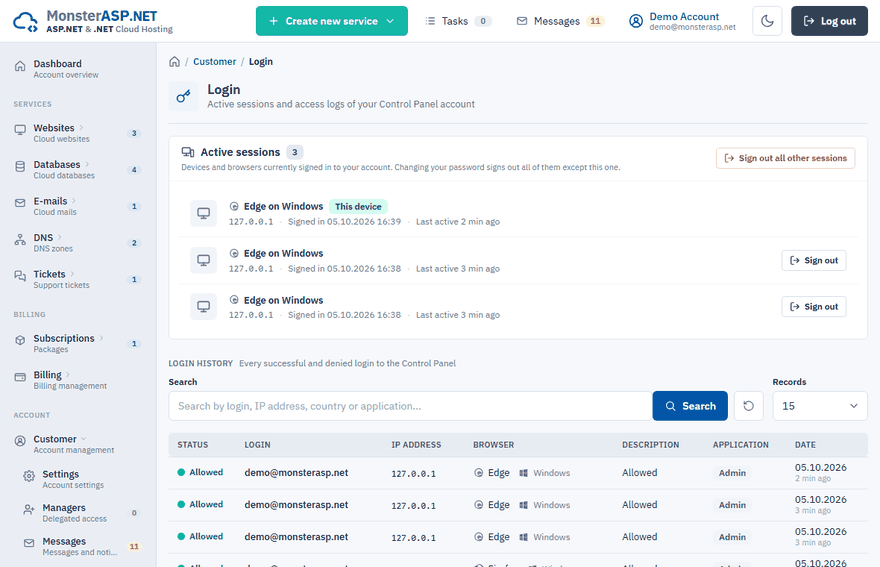
The Login page shows which devices are signed in to your account right now and keeps a record of every successful and denied login to the Control Panel. Check it whenever something looks unusual.
Open the page
Sign in to the Control Panel and choose Login in the Customer section of the left menu.
Active sessions
The Active sessions card lists the devices and browsers currently signed in to your account. For each one you see the browser and system, the IP address with its country, when it signed in and when it was last active.
| Badge | Meaning |
|---|---|
| This device | The browser you are using right now. |
| Remember me | The session was started with Remember me on the login page, so it stays signed in on that device. |
To end a session:
- Click Sign out next to a device. It will have to sign in again with the password.
- Click Sign out all other sessions to sign out every device except the one you are using. Saved sign-ins (Remember me) on those devices stop working too.
Note
If you work in an account with delegated access, you cannot sign out its sessions. Only the account owner can.
Login history
Below the sessions is the list of logins. Each record contains:
| Column | What it shows |
|---|---|
| Status | Allowed for a successful login, Denied for a refused one. |
| Login | The e-mail address that was used. |
| IP address | The address and country the login came from. |
| Browser | The browser and operating system. |
| Description | Details of the login, for example why it was denied. |
| Application | The application the login was made to. |
| Date | When it happened. |
Use Search to filter by login, IP address, country or application, and Records to choose how many rows are shown.
You see a login you do not recognise
Change your password
Follow Change or reset your password. Changing the password signs out all other devices and browsers.
Turn on two-factor sign-in
With two-factor sign-in a password alone is no longer enough to sign in.
Review who has access
Check the Managers page and remove anyone who should no longer have delegated access.