Allow remote access to a database
Enable connections from outside and restrict them to your IP addresses.
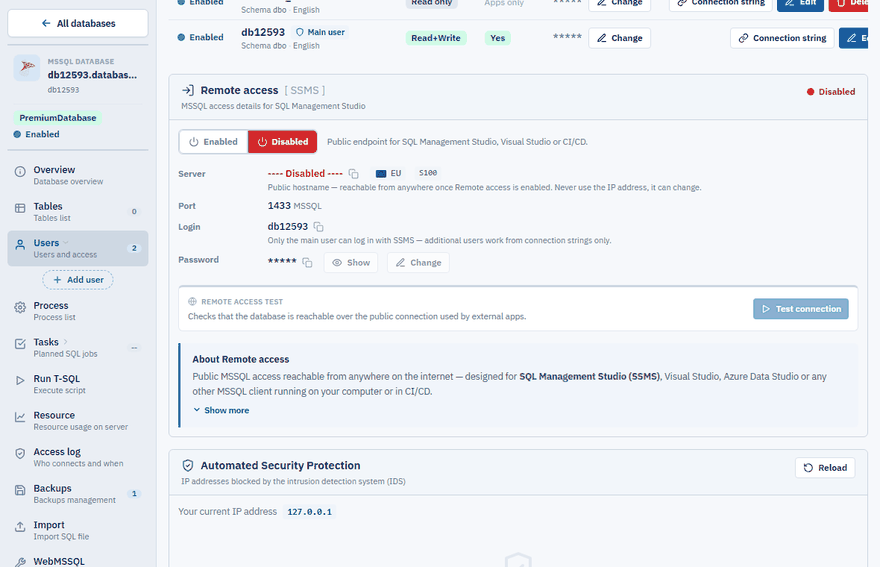
By default a database accepts connections only from websites hosted with us. To connect from your own computer — from SQL Server Management Studio, Visual Studio, Power BI or an application running elsewhere — you have to enable remote access and use the public server address.
Enable remote access
Open your database
In the Control Panel go to Databases and open the database.
Enable remote access
Open Users and in the Remote access panel switch remote access to Enabled.
Use the public server address
Connect to the address shown in the Server row of the same panel. It contains the word
public, for exampledbXXXX.public.databaseasp.net. Always use this name, never an IP address — the IP address can change.Test it
Click Test connection in the panel. It checks that the database is reachable over the public connection.
Note
Only the main database user can sign in from SQL Server Management Studio. Additional users you create work from connection strings only.
Local or public address?
| Where the connection comes from | Which address to use |
|---|---|
| A website hosted with us | The local connection string. The website talks to the database directly, which gives the best performance. |
| Your computer, another hosting, any external tool | The remote connection string with the public server address. Remote access must be enabled. |
Both connection strings are shown in the Control Panel — see Find your connection string.
Test that the server is reachable
Open the public address of your database server in a web browser, for example http://dbXXXX.public.databaseasp.net. If you see the green message Server is online, your network can reach our server.
If the page does not open, the connection is being blocked on the way — typically by a company firewall, a router or an internet provider that does not allow outgoing connections to database ports. Try another network (for example a mobile hotspot) to confirm it.
Too many wrong passwords
If you repeatedly connect with a wrong login or password, our automatic security system blocks your IP address for 24 hours. See Database connection blocked after failed logins.