A tour of the Control Panel
Where to find websites, databases, e-mails, DNS, billing and account settings in the Control Panel.
The Control Panel is where you manage everything on your MonsterASP.NET account. This page shows you how it is organised, so you always know where to look.
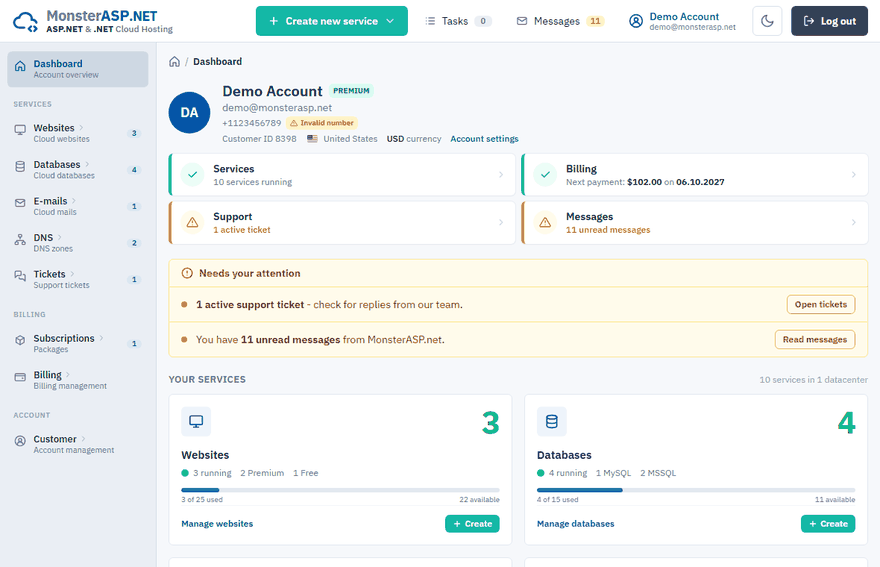
The main menu
The menu on the left is split into three groups.
Services
| Menu item | What you do there |
|---|---|
| Dashboard | An overview of your account and your services. |
| Websites | Create and manage your cloud websites. |
| Databases | Create and manage MSSQL, MySQL and PostgreSQL databases. |
| E-mails | Set up e-mail hosting, mailboxes and aliases. |
| DNS | Manage the DNS zones of your domains. |
| Tickets | Open a support ticket and follow our answers. |
Billing
| Menu item | What you do there |
|---|---|
| Subscriptions | Buy, extend, renew or upgrade a Premium subscription. |
| Invoices | Find and download your invoices. |
| Contacts | Change the billing details shown on invoices. |
Account
| Menu item | What you do there |
|---|---|
| Settings | Your account details, password and sign-in security. |
| Managers | Give other people delegated access to your account. |
| Messages | Messages and notifications we sent you. |
| Tasks | The queue of operations running in the background. |
| Login | A log of sign-ins to your account. |
Inside a website
When you open a website, the left menu changes to the tools for that one website.
| Menu item | What you do there |
|---|---|
| Overview | Basic information and the current state of the website. |
| Files | Browse and edit files in the File manager. |
| Domains | Add your own domains (aliases / bindings). |
| HTTPS | Manage SSL certificates and the HTTPS redirect. |
| Subdomains | Create third-level domains. |
| Deploy | FTP / SFTP and Visual Studio (Web Deploy) access. |
| Git deploy | Deploy from a GitHub repository. |
| Scripting | ASP.NET and PHP settings. |
| AppInstaller | Install a ready-made application. |
| Process | The list of running processes. |
| Tasks | Planned jobs. |
| Resource | Resource usage on the server. |
| Logs | Error and access logs. |
| Upgrade | Transfer the website or scale it up. |
Inside a database
Open a database from the Databases list and the left menu switches to the tools for that database. This is the menu of an MSSQL database; MySQL and PostgreSQL databases have a similar, slightly shorter one.
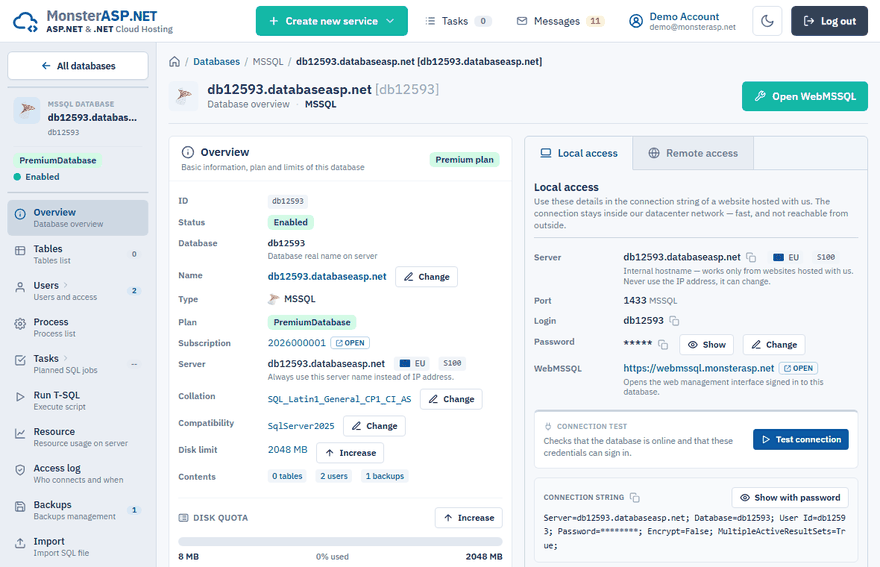
| Menu item | What you do there |
|---|---|
| Overview | Basic information, the plan and the disk limit of the database. |
| Tables | The list of tables and their sizes. |
| Users | Database users, connection strings and remote access. |
| Process | The list of open connections and running queries. |
| Tasks | Planned SQL jobs. |
| Run T-SQL | Execute a script directly in the Control Panel. |
| Resource | Resource usage on the server. |
| Access log | Who connects to the database and when. |
| Backups | Create, download and restore backups. |
| Import | Import a SQL file. |
| WebMSSQL | Open the database in a web interface. |
| Upgrade | Transfer the database or scale it up. |
More about each of them is in the Databases section.
Inside an e-mail domain
Open a domain from the E-mails list to manage its mailboxes.
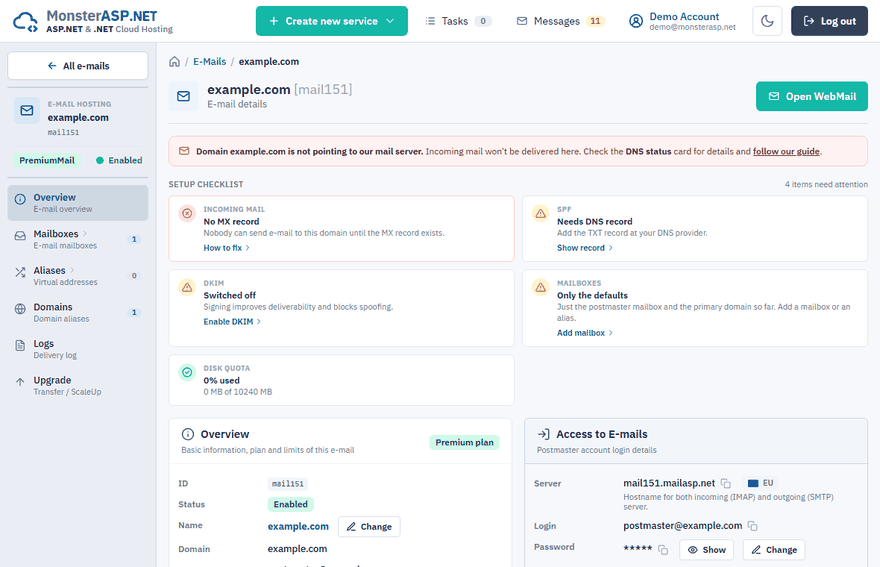
| Menu item | What you do there |
|---|---|
| Overview | The state of the e-mail domain, its mail server and the setup checklist. |
| Mailboxes | Create mailboxes and change their passwords. |
| Aliases | Virtual addresses that deliver to one or more mailboxes. |
| Domains | Domain aliases — other domains that receive mail in the same mailboxes. |
| Logs | The delivery log of sent and received messages. |
| Upgrade | Transfer the e-mail domain or scale it up. |
More about each of them is in the E-mails section.
Tip
Subscriptions, DNS zones and support tickets work the same way: open one from the list and the left menu switches to its own tools.